|
|
|
|
|
CountIF |
|
Counting markets per parent |
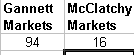
- =COUNTIF(C1:C17,"=Gannett")
|
|
- For instance, how many markets at Gannett,
McClatchy, and Tribune are on the list?
|
|
|

|
|
CountIF |
|
Counting markets above meeting certain number of sales |
|
|
|
- For instance, how many markets sold at least 50
listings?
|
|
|
|
|
Sum |
|
Summing ad types per parent |
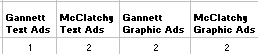
- =SUM((A1:A7="Gannett")*(B1:B7="Text Ad"))
- This formula counts the number of specified types
of ads by the specified parent.
- For instance, show the parent company Gannett's
sales of Text Ads.
- This can be paired with a similar formula next to
it, for counting the McClatchy text ads.
- Similarly, other ad types can be counted, for
instance, graphic ads, etc.
|
|
- For summing up types of ads per parent company
- For instance, how many text ads versus graphic
ads did Gannett, McClatchy, and Tribune sell each?
- Note, this formula is MORE specific than simply
counting the total number of ads.
|
|
|
|
|
SumIF |
|
Summing ads per parent |
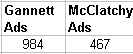
- =SUMIF(B1:B300,"=Gannett",C1:C300)
- This formula counts numbers in column C, such as
number of Ads, where column B is parent company name of "Gannett"
|
|
- For summing up total ads per parent company
- For instance, how many ads did Gannett,
McClatchy, and Tribune sell each?
- Note, this formula is LESS specific since it
simply counts the total number of ads.
|
|
|
|
|
Percentage Change |
|
|
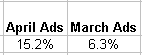
- (B7/B8)/-1
- If March is B7
AND
February is B8
|
|
- This formula reports the percentage change, from
one month to another
|
|
|
|
|
Raw Change |
|
|
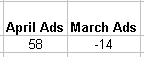
- B7/B8
If March is B7
AND
February is B8
|
|
- This formula reports the absolute numerical
change, from one month to another
|
|
|
|